🇳🇵 Nepali Age Calculator in AD
Calculate your age in Gregorian (AD) Calendar with Nepali Interface
🎂 तपाईंको उमेर (Your Age)
📅 मिति विवरण (Date Details)
📊 अतिरिक्त जानकारी (Additional Information)
🔄 बि.सं. मिति (BS Date Conversion)
Related
Nepali Age Calculator in AD – Complete Guide
Calculating age may look simple, but it often becomes confusing when dates are written in different formats or languages. This is especially true for Nepali users who are more comfortable with Nepali language interfaces but need results based on the Gregorian (AD) calendar.
A Nepali Age Calculator in AD solves this exact problem by combining Gregorian date logic with a Nepali-friendly interface.
This tool helps users accurately calculate their age in years, months, and days using AD dates while displaying labels, months, and guidance in Nepali.
What Is a Nepali Age Calculator in AD?
A Nepali Age Calculator in AD is an online tool that calculates a person’s exact age using Gregorian (Anno Domini – AD) dates, while the input fields and interface are presented in the Nepali language.
In simple words:
- Calendar system → AD (Gregorian)
- Language interface → Nepali
- Output → Exact age (Years, Months, Days)
This makes the tool ideal for Nepali users living in Nepal or abroad who deal with AD dates for official, educational, or international purposes.
Why Use an Age Calculator in AD with Nepali Interface?
Many official and global systems work strictly on the AD calendar, such as:
- Passports and visas
- Government forms
- School and university records
- Job applications
- Medical and insurance documents
However, not everyone is comfortable using English tools. A Nepali age calculator in AD removes this barrier by offering:
- Nepali date labels
- Nepali month names
- Clear instructions in Nepali
- Easy-to-use dropdowns
This combination improves accuracy and reduces user errors.
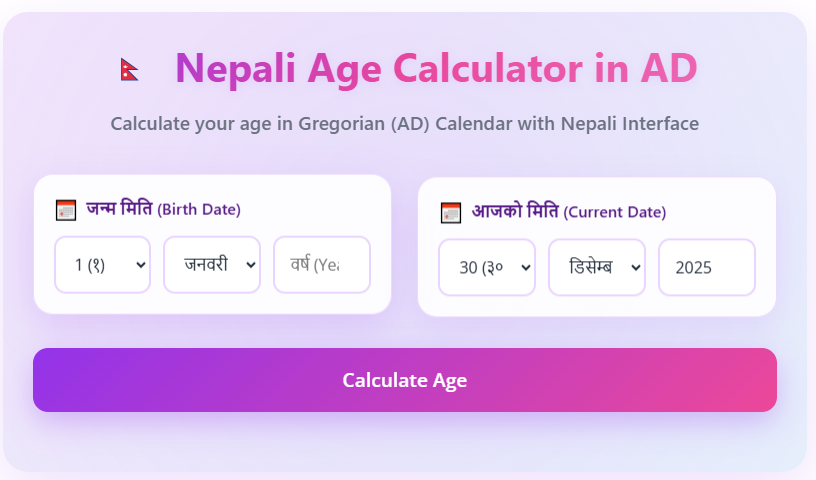
How to Use the Nepali Age Calculator in AD
Using the Nepali Age Calculator in AD is very easy and takes only a few seconds. Follow these simple steps:
Step 1: Select Birth Date (जन्म मिति)
Choose your birth day, month, and year from the dropdown menus.
Make sure the date is in AD (Gregorian) format.
Step 2: Select Current Date (आजको मिति)
The current date is usually selected automatically.
You can change it manually if you want to calculate age for a specific date.
Step 3: Click on “Calculate Age”
After selecting both dates, click the Calculate Age button.
Step 4: View Your Age Result
The calculator will instantly show your exact age in:
- Years
- Months
- Days
Features of Nepali Age Calculator in AD
1. Gregorian (AD) Accuracy
The calculator strictly follows the AD calendar, ensuring correct age results for official and legal use.
2. Nepali Language Support
Field labels like:
- जन्म मिति (Birth Date)
- आजको मिति (Current Date)
This makes the tool easy for Nepali speakers of all age groups.
3. Exact Age Calculation
Instead of approximate age, it provides:
- Exact years
- Remaining months
- Remaining days
4. No Manual Calculation Needed
Users don’t need to remember formulas or count days manually. One click gives instant results.
Who Can Use This Tool?
A Nepali Age Calculator in AD is useful for:
- Students – admission forms, exams, certificates
- Job seekers – eligibility and application forms
- Parents – calculating children’s age
- Government form applicants
- Doctors and hospitals
- Anyone needing accurate age in AD
Benefits of Using
- Saves time
- Eliminates human error
- Easy for non-English users
- Works instantly
- No installation required
- Free to use
It is especially helpful for users who get confused while converting dates or calculating age manually.
AD vs BS: Important Clarification
Many Nepali users confuse AD and BS calendars.
- AD (Anno Domini) → International Gregorian calendar
- BS (Bikram Sambat) → Nepali calendar
A Nepali Age Calculator in AD:
- Uses AD dates only
- Does not convert BS to AD
- Displays everything in Nepali language for clarity
If someone needs BS-based age, they should use a Nepali Age Calculator in BS, which is a different tool.
Common Use Cases
- Checking age eligibility for exams
- Filling international application forms
- Passport and visa age verification
- Medical age records
- School and college documentation
FAQs
What is a Nepali Age Calculator in AD?
A Nepali Age Calculator in AD is an online tool that calculates your exact age using the Gregorian (AD) calendar while showing all labels and inputs in the Nepali language.
Does this calculator work on AD or BS dates?
This calculator works only with AD (Gregorian) dates. It does not convert Bikram Sambat (BS) dates.
Who can use the Age Calculator?
Anyone can use it, including students, job applicants, parents, doctors, and users filling government or international forms.
Conclusion
A ‘AD Nepali Age Calculator’ is a perfect blend of global date standards and local language comfort. It allows Nepali users to calculate their exact age using the Gregorian calendar without struggling with English-only tools.
If you need accurate, fast, and error-free age calculation in AD, and want everything explained in Nepali, this calculator is the ideal solution.